AmbersightWarnings for Cloudflare Workers

Workers warnings chart Demo fleet Tuesday 10 November 2026

  • Yellow: info, worth a look
  • Amber: warning
  • Red: critical
Warnings chart for the demo fleetA map of a made-up demo fleet. Three Cloudflare accounts are drawn as regions: Acme production on Workers Paid, Bloom (client) on the Free plan, and Staging. Workers are towns. The warning areas change with the chart time below.auth-gatewayapi-edgeimage-resizercheckoutsearchwebhooksbloom-siteold-landingcron-digestog-imagesapi-edge-stagingcheckout-stagingACME PRODUCTIONWorkers Paid · 12 WorkersBLOOM (CLIENT)Free plan · 4 WorkersSTAGINGFree plan · 3 WorkersDemo fleet · 3 accounts · 19 Workers

BulletinIssued · Valid until

Find the Cloudflare Worker that is about to break, run up a bill or sit exposed.

Your whole Workers fleet on one page. Read-only. Free. No code changes.

About 5 minutes to install. Costs nothing on the Free plan.

In force at 14:00 UTC Demo fleet

  1. Red

    auth-gateway Acme production
    6.2% of requests failed in the last 24 hours, right after a deploy. Filed as critical.

  2. Amber

    Daily requests Bloom (client), Free plan
    71,190 of 100,000 requests used (71%). On track to reach the limit at 19:40 UTC.

  3. Info

    old-landing Bloom (client)
    No requests in 30 days. Still answers on workers.dev.

14:00 UTC

Drag or use the arrow keys. Ambersight scans every hour, so the chart moves an hour at a time. Demo data.

One Worker in your account, reading the sky every hour

The Cloudflare dashboard shows each Worker on its own. Ambersight shows you the fleet and tells you which Workers need attention, and why, in plain sentences.

  1. It reads

    Every hour it reads your Workers' settings and metrics with a read-only API token. Only GET requests and GraphQL queries, at most 3 GraphQL requests per scan.

  2. It compares

    83 checks. Each Worker is measured against fixed lines, such as 2% errors, and against its own usual hour over the past 7 days.

  3. It issues

    A ranked list of what to fix, critical first. Each finding has the evidence, a suggested fix, a link to the Cloudflare docs and an Explain in plain words section.

Ambersight runs as one Worker inside your Cloudflare account. It reads from the Cloudflare API with GET and GraphQL only, stores its data in your own D1 database, leaves your Workers untouched, and sends alerts only to the channels you set up.Your Cloudflare accountapi-edgeauth-gatewayimage-resizercron-digestYour Workers: not changed,not redeployed, no SDKAmbersightone Worker, 1 cronYour D1 database13 months of historyCloudflareAPIGET, GraphQLread-only tokenalerts to your channelsScans every hourAmbersight runs as one Worker inside your Cloudflare account. It reads from the Cloudflare API with GET and GraphQL only, stores its data in your own D1 database, leaves your Workers untouched, and sends alerts only to the channels you set up.Cloudflare APIGET, GraphQLread-only tokenalerts to yourchannelsYour Cloudflare accountAmbersightone Worker, 1 cronapi-edgeauth-gatewayimage-resizercron-digestYour Workers: not changed,not redeployed, no SDKYour D1 database13 months of historyScans every hour
Nothing is sent to us. There is no telemetry and no tracking.

What it catches

83 checks, each with a default threshold you can change globally, per group or per Worker. Findings from the same check are grouped, so fourteen Workers with public preview URLs are one row with one fix. By default critical findings are e-mailed at once, and everything else waits for the digest.

Critical

Red on the chart. Act now. E-mailed the moment a scan finds it.

Critical checks and their thresholds
Ambersight tells you whenThresholdCheck ID
A free daily limit is nearly used: 100,000 requests, 5 million D1 rows read, 1,000 KV writes and the rest90% of the limit, with the time you hit itbudget:free-daily-*
Requests, CPU time or subrequests run away from a Worker's usual hour5x the usual hour, and at least 500 requests, 60 s CPU or 2,000 subrequestsrunaway:traffic-spike
D1, KV, R2, Queues or Durable Object operations jump5x the usual hour, at least 1,000usage:ops-spike-*
An idle loop on Workers Paid: storage busy while nobody uses the app2,000 operations an hour for 3 hours, under 1 request per 100 operationsusage:idle-loop-*
A Worker's requests fail10% in 24 hourserrors:error-rate
A problem starts right after a deployA deploy in the 60 minutes before it: a warning becomes criticalerrors and runaway checks
The monthly budget on Workers Paid is passedPast the budget you setbudget:monthly-budget
Preview URLs are public although workers.dev is offAnyexposure:previews-without-workers-dev
A DNS record points at a Pages project anyone could claimAnysecurity:dangling-pages
A D1 database nears its hard cap95% of 500 MB (Free) or 10 GB (Paid)budget:storage-d1-db
Ambersight's own token gains a permission it has no use forChecked every dayhealth:token-scope

Warning

Amber on the chart. Be prepared. Goes into the digest, or to any channel you choose.

Warning checks and their thresholds
Ambersight tells you whenThresholdCheck ID
You are on track to hit a free daily limit (Error 1027 for requests)70% of the limit, with roughly whenbudget:free-daily-requests
A Worker's error rate rises2% in 24 hours, or 3x its own baselineerrors:error-rate
Invocations hit the CPU or memory limitAny in 24 hourserrors:resource-limit
Scheduled runs are missed or failFewer runs than the cron expectscron:missed-runs
A D1 database, KV, R2 or Durable Object storage fills up80% of the capbudget:storage-*
The monthly bill heads past your budget80% of it, or a month-end forecast past itbudget:monthly-budget
A gradual rollout is left split24 hoursdeploys:stuck-rollout
A binding, variable or secret disappears after a deployGone since the last readdrift:binding-removed
Every version gets a public preview URL, or workers.dev answers beside your routeAnyexposure:preview-urls
A member is added or a certificate is about to expireLast 7 days; 7 days before expirysecurity:member-change
Service Worker syntax, an old compatibility date or Workers SitesDate 12 months olddeprecation:old-compat-date

Info

Housekeeping. Folded away until you open it. Each leftover comes with the exact command to remove it. Ambersight never deletes anything.

Info checks and their thresholds
Ambersight tells you whenThresholdCheck ID
A Worker has had no traffic, or was never deployed30 days without a requestzombies:no-traffic
KV, D1, R2 or a queue is bound to nothing, or bound and never usedNo operations in 30 dayszombies:unbound-kv
A route or service binding points at a deleted WorkerAnyzombies:orphan-route
A Worker answers only on a public workers.dev addressAnyexposure:workers-dev-public
A busy Worker logs every request (logs are billed per GB from 1 December 2026)100% sampling, 10,000 requests a dayusage:logs-full-sampling
A D1 query reads millions of rows to return a few1 million rows a day, 100 read per row returnedusage:d1-inefficient-query
p99 CPU nears the Free plan's 10 ms80% of the limiterrors:cpu-near-limit
You are running out of Cron Triggers4 of 5 on Freecron:cron-count

Critical auth-gateway Demo fleet

6.2% of requests failed in the last 24 hours. It started right after a deploy.

Compare the deploy of 2026-11-09 22:14 UTC with the one before it, or roll back. Open the Worker in Workers Observability and look at the most frequent exception.

This is what a finding looks like.

Also on the list: config drift between staging and production, Pages deploys that fail, a pages.dev address that skips your WAF, certificates stuck in validation, Ambersight's own token close to expiry, and npm packages a major version behind (opt-in). All 83 checks, with thresholds, IDs and fixes

Two plans, two kinds of storm

On the Free plan the risk is an outage. On Workers Paid the risk is the bill. Ambersight knows which plan each account is on.

Free plan: outage

Demo data
Demo data: requests in one Free account through a day. The line crosses 70% at about 15:30 UTC, 90% at about 18:20 UTC and reaches 100,000 at 19:40 UTC. From then until midnight UTC every Worker in the account answers with Error 1027.025k50k75k100k70%: warning90%: critical19:40 UTCError102700:0006:0012:0018:0024:00

Past 100,000 requests in a day, every Worker in the account answers with Error 1027 until midnight UTC. The same goes for 1,000 KV writes, 5 million D1 rows read and the other daily limits. Ambersight warns you at 70% and again at 90% of each one, with the time you will hit it at today's pace.
What Error 1027 means Every Workers Free limit

Workers Paid: the bill

Demo data
Demo data: requests per hour for one Worker on Workers Paid. Eleven hours sit near its usual hour of 18,458 requests. The last hour has 107,316 requests, about 6 times the usual hour.030k60k90k120kusual hour: 18,4585x: critical107,316−11 h−8 h−5 h−2 hlast hour

Cloudflare's spending limit covers only requests and CPU time, and it is not an exact maximum: usage goes on while the block catches up, and when it lands, every Worker in the account stops. Until then, a loop, a retry storm or a crawler is billed for every hour it runs. Ambersight compares each Worker's last hour with its usual hour and alerts you at 5x, for requests, CPU time, subrequests and D1, KV, R2, Queues and Durable Object operations. It also shows the estimated bill in dollars and checks it against your monthly budget within the hour.

The bill and Cloudflare's spending limit

Screenshots from the dashboard

Every screenshot shows a made-up demo fleet: Acme production on Workers Paid, Bloom (client) and Staging on the Free plan.

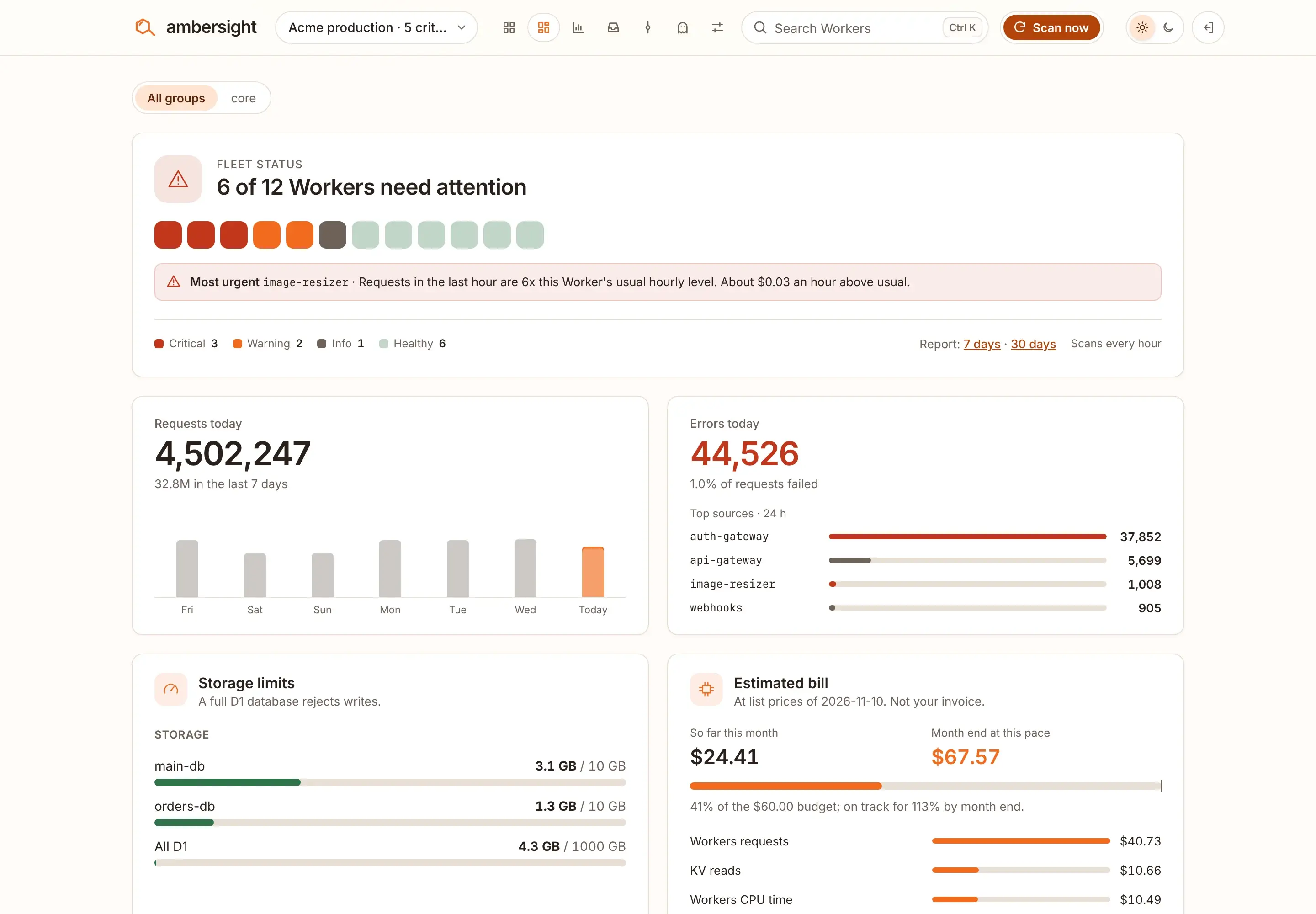
OverviewDemo fleet

The Ambersight overview for the Acme production account: 6 of 12 Workers need attention, the most urgent is image-resizer at 6x its usual hourly requests, with requests and errors today, storage limits and an estimated bill of $24.41 against a $60 monthly budget.
The overview of one account. Six of twelve Workers need attention, the most urgent first, with requests and errors today, storage and the estimated bill against a monthly budget.

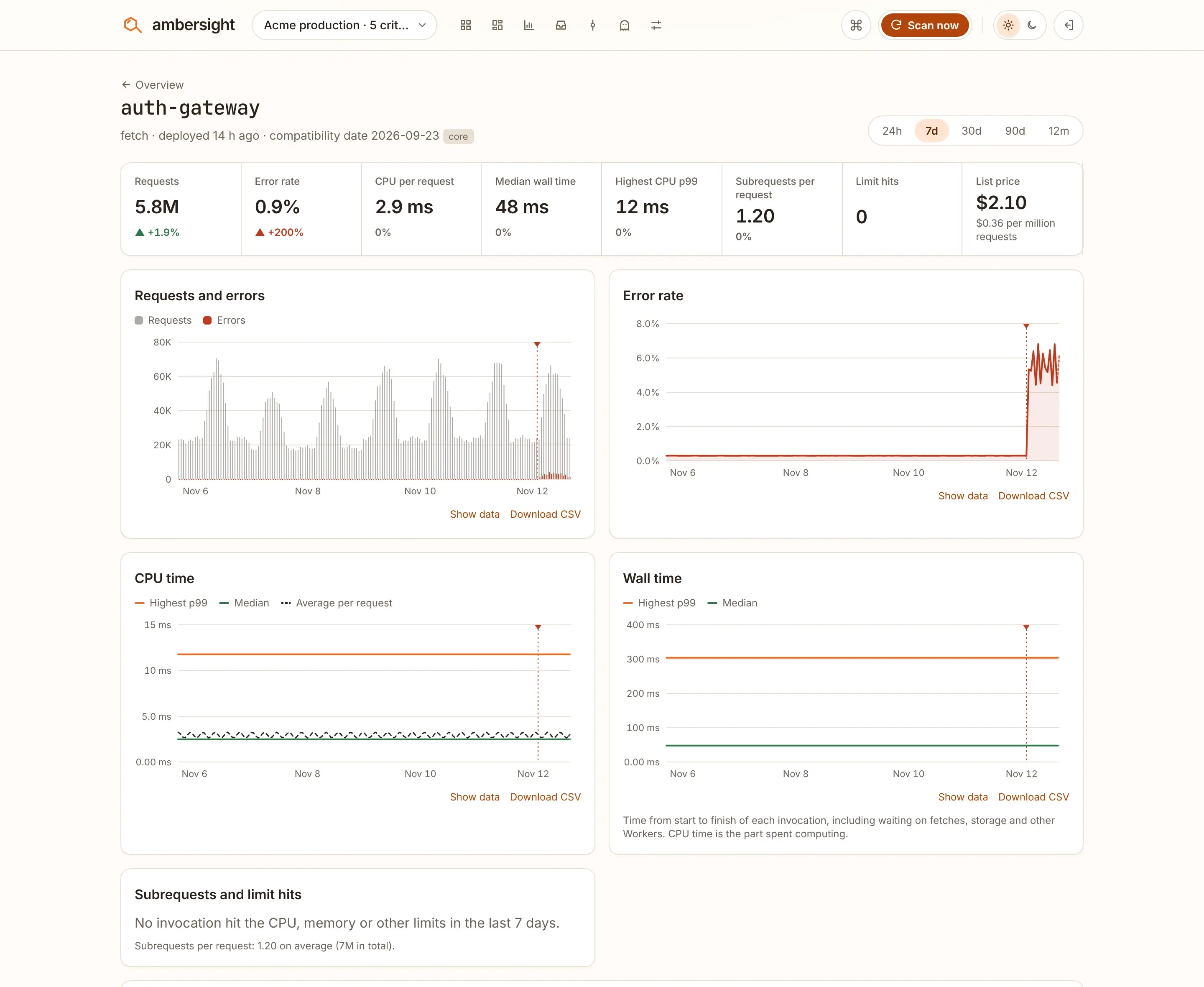
One WorkerDemo fleet

The page of auth-gateway: requests, error rate, CPU and wall time over 7 days, with the deploy 14 hours ago marked where the error rate jumps to about 6%.
auth-gateway on its own page. The deploy 14 hours ago is marked where the error rate jumps.

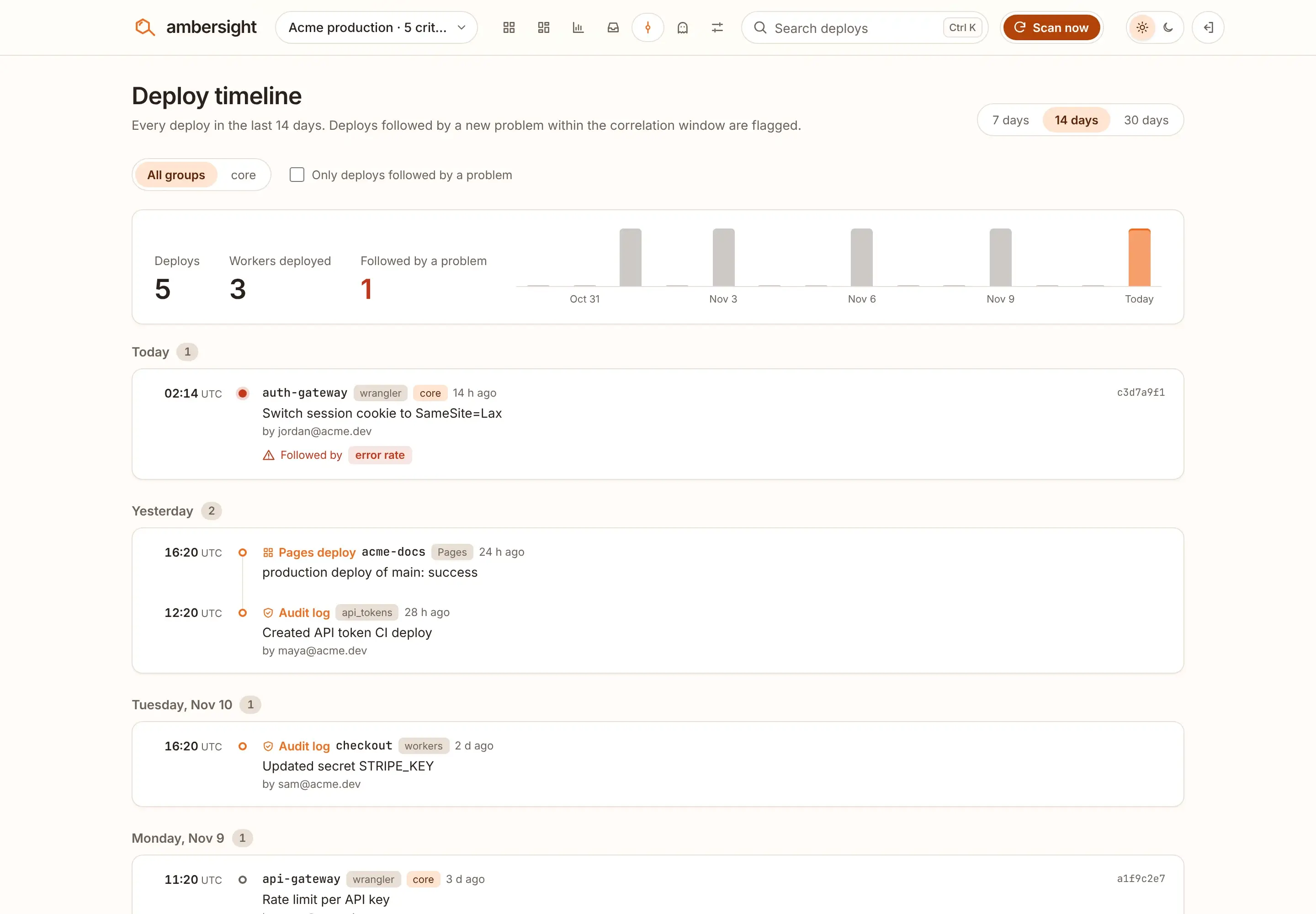
Deploy timelineDemo fleet

The deploy timeline: five deploys in 14 days, a Pages deploy and audit log entries. The auth-gateway deploy is flagged as followed by an error rate rise.
Deploys, Pages builds and audit log changes. The deploy followed by a new problem is flagged.

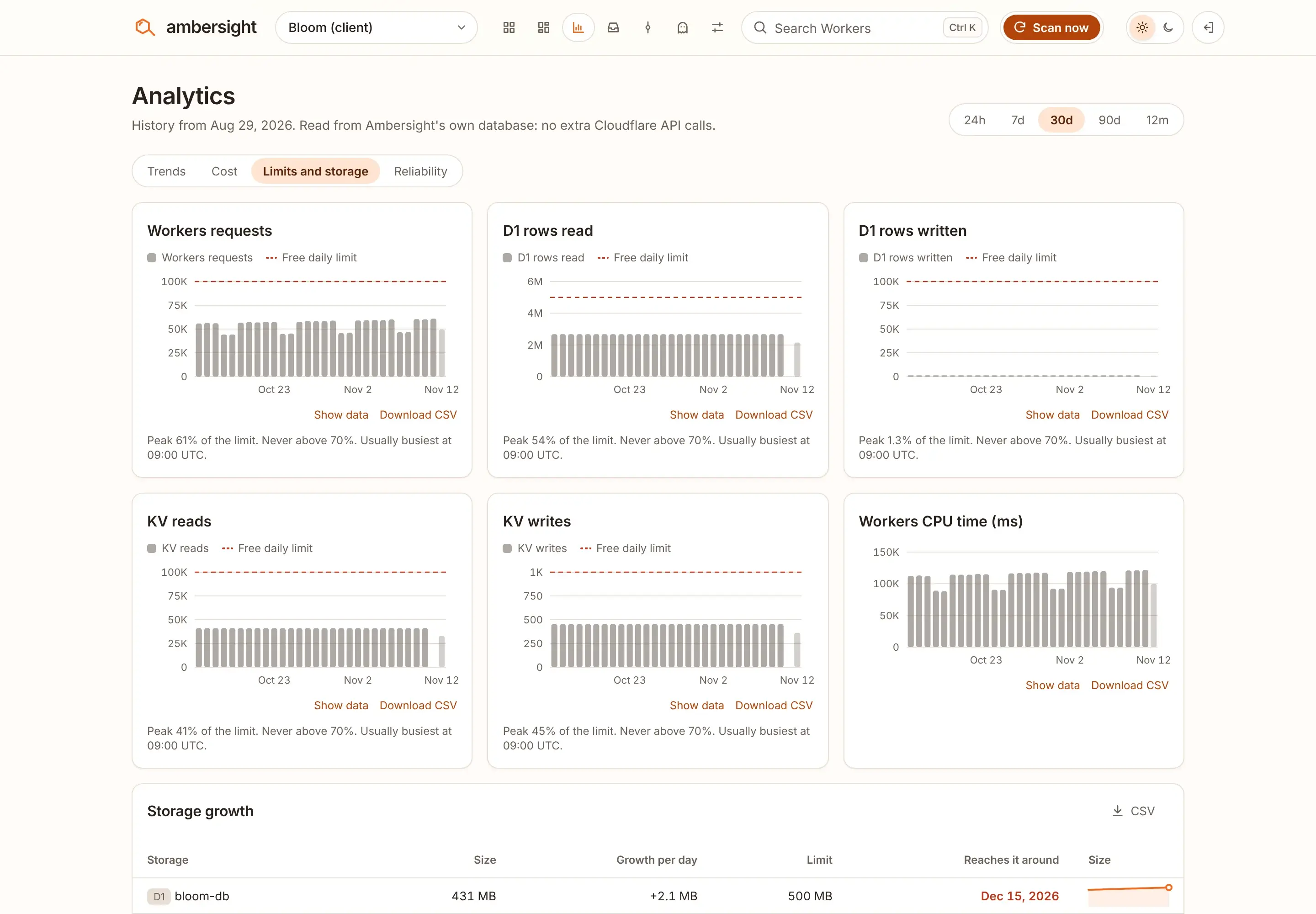
Limits and storageDemo fleet

Limits and storage for the Bloom Free plan account: requests, D1 rows and KV operations per day against their free daily limits, and the bloom-db D1 database reaching its 500 MB cap around December 15, 2026.
A Free account: how close each daily limit runs, and the date its D1 database reaches 500 MB.

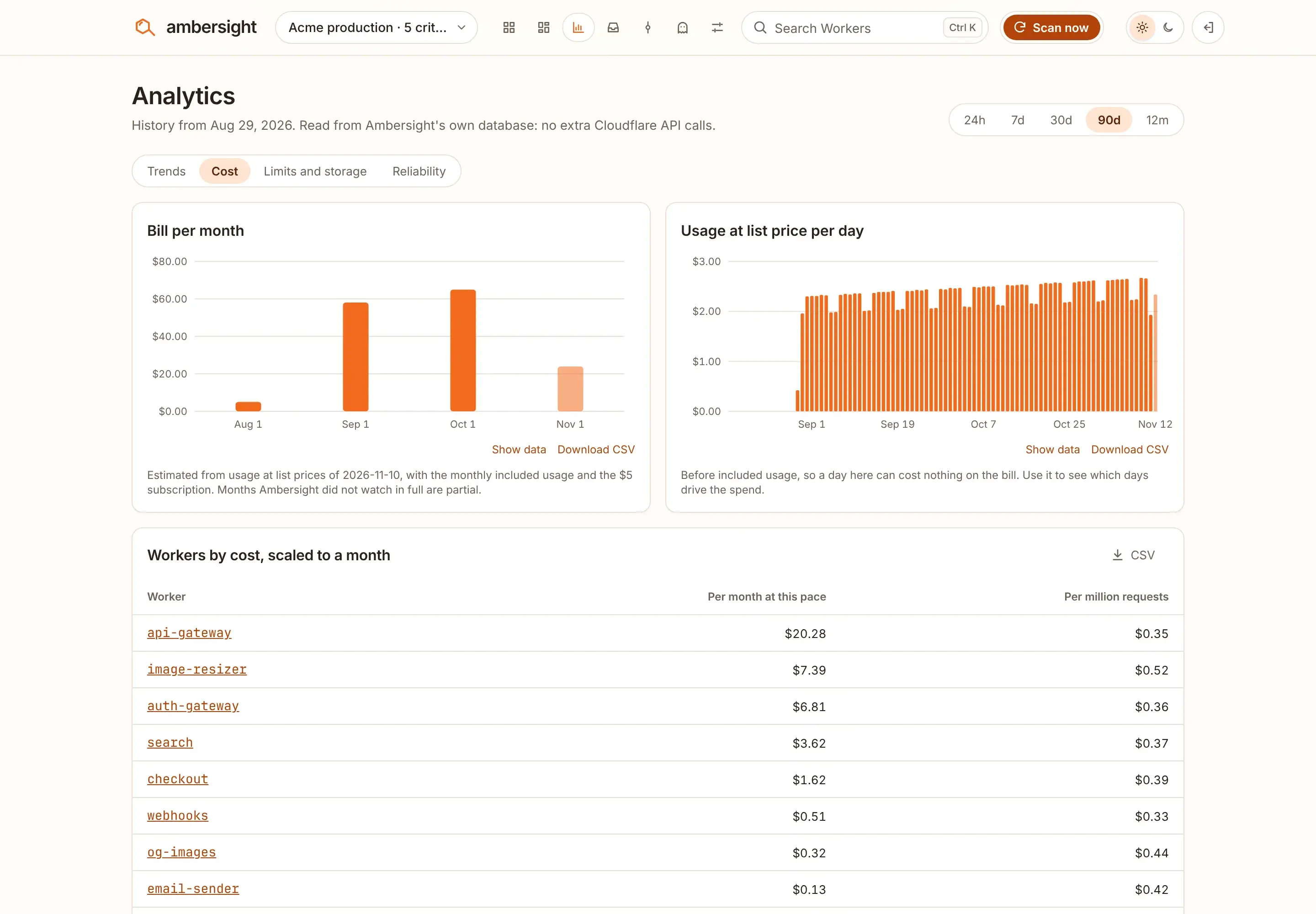
CostDemo fleet

Analytics, Cost: the estimated bill per month, usage at list price per day, and Workers ranked by cost per month and per million requests.
On Workers Paid: the bill per month, spend per day and the Workers behind it.

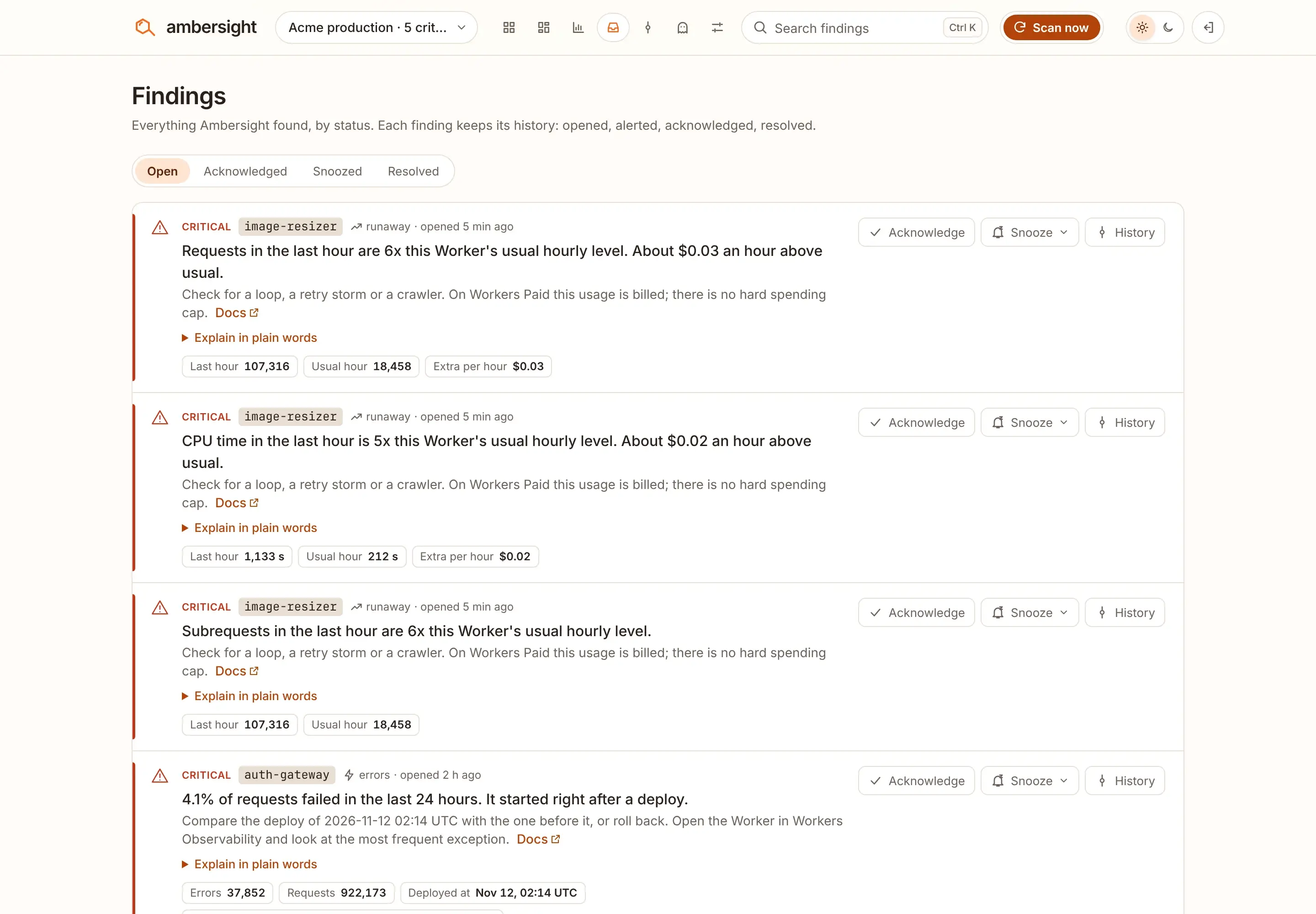
FindingsDemo fleet

The Findings inbox: critical findings for image-resizer and auth-gateway, each with Acknowledge, Snooze and History, and tabs for acknowledged, snoozed and resolved findings.
Open, acknowledged, snoozed and resolved. Each finding keeps its history.

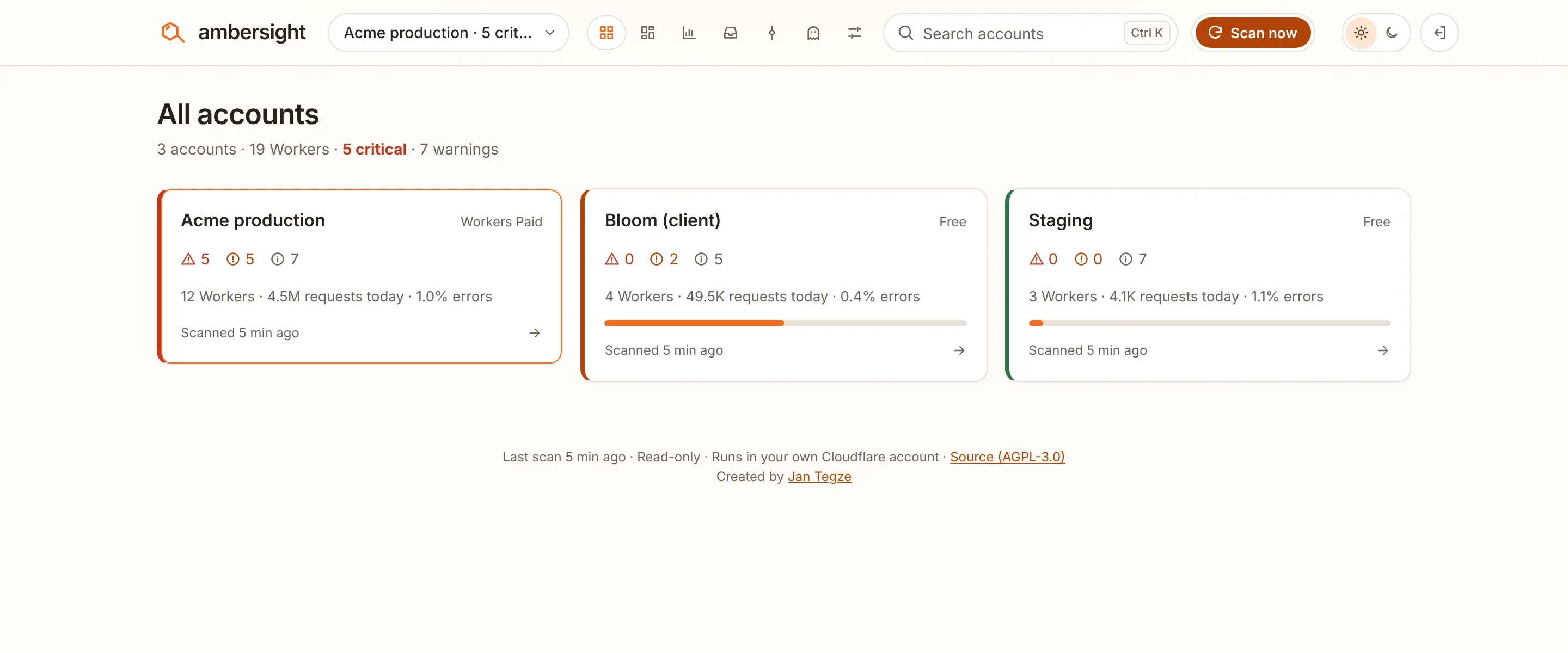
All accountsDemo fleet

All accounts: Acme production, Bloom (client) and Staging side by side, each with critical, warning and info counts, Workers, requests today and error rate.
One install watches every account the token can see.

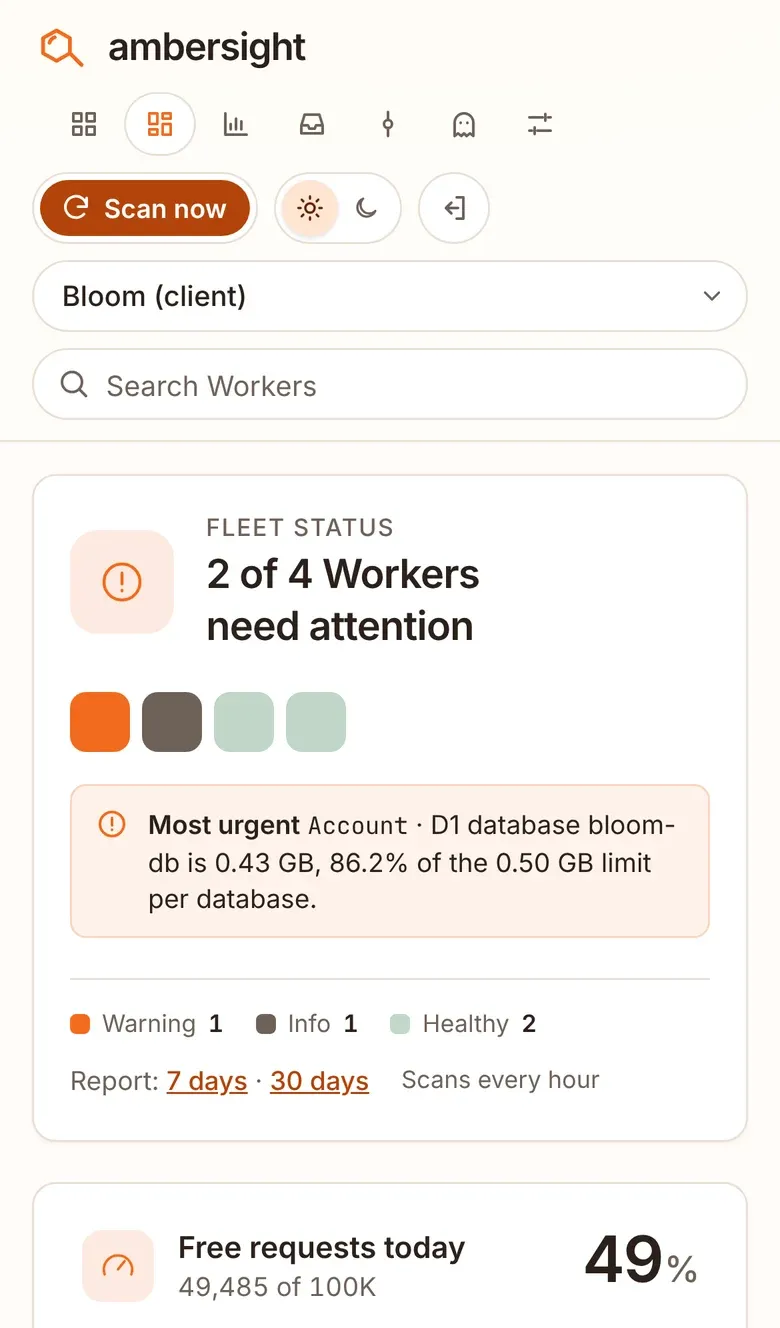
PhoneDemo fleet

The overview on a phone for the Bloom client account: 2 of 4 Workers need attention, with the D1 database bloom-db at 86.2% of its 0.5 GB limit.
Install it as an app. It opens offline with data up to 7 days old.

Why you can trust it with your account

Read-only, by design.
It only sends GET requests and GraphQL queries to the Cloudflare API. The setup wizard reads your token's permissions and refuses to continue if it finds a write permission. Every day it reads them again and raises a critical finding for anything it does not expect.
Your account, your data.
It runs in your Cloudflare account and stores everything in your own D1 database. Nothing is sent to us.
No code in your Workers.
Ambersight reads what Cloudflare already records. Your Workers are never touched or redeployed.
Free to run.
With 30 Workers it uses well under 1% of the free plan's daily requests and 1 of your 5 Cron Triggers. Its own logs are off.
Open source.
AGPL-3.0. Read every line before you deploy it.

The token you createAmbersight read-only

Permissions of the pre-filled API token
PermissionAccess
Workers ScriptsRead
Account AnalyticsRead
Account SettingsRead
Workers KV Storage, D1, Workers R2 Storage, QueuesRead
Workers Routes, ZoneRead
Cloudflare PagesRead
SSL and Certificates, DNSRead
BillingRead
API TokensRead
Not one Edit permission, so the token cannot change anything. It can still read a lot, so narrow it to the accounts you want watched.

Install in about 5 minutes

You need a Cloudflare account. The free plan is fine. Both ways start with the same step.

First, create a read-only API token

Open the pre-filled token form, check that every permission says Read, click Continue to summary, then Create Token. Copy the token now; Cloudflare shows it only once.

Open the pre-filled token form

Deploy button

Most people. No terminal. Updates deploy on every push to your copy.

  1. Click Deploy to Cloudflare, sign in and connect GitHub or GitLab.
  2. Fill in the two fields:
    CF_API_TOKEN
    The read-only token from the first step.
    ADMIN_PASSPHRASE
    At least 12 characters. You sign in with it, so put it in your password manager.
  3. Click Deploy. Cloudflare copies the repository into your account, creates the D1 database and deploys the Worker.
  4. Open the link on the deploy page, sign in and follow the three setup steps. The first scan starts on its own, then runs every hour.
Deploy to Cloudflare

Terminal

For developers who use Wrangler and want the config in their own repo. Node.js 22.12 or newer and git.

git clone https://github.com/jntegz/ambersight.git
cd ambersight
npm ci
npx wrangler login

# First deploy: builds the UI and creates the D1 database
npm run build
npx wrangler deploy

# Create the tables
npx wrangler d1 migrations apply DB --remote

# Add the two secrets
npx wrangler secret put CF_API_TOKEN
npx wrangler secret put ADMIN_PASSPHRASE

Wrangler prints your dashboard URL at the end. From then on, npm run deploy builds, migrates and deploys.

Self-cost1 Cron Trigger, fired every 15 minutes · Scans every hour by default

What it costs

Nothing, on the Workers Free plan. With 30 Workers:

Cron Triggers
1 of your 5
Requests
well under 1% of 100,000 a day
Subrequests
at most 42 per scan, inside the free 50
D1 and CPU
about 10 D1 calls per scan

The Self-cost panel in Settings shows the measured numbers for your account.

Where the warnings go

Alerts go to e-mail, Slack, Discord, Telegram or any webhook. E-mail is free through Cloudflare's own send_email binding to a verified address. For chat, paste one incoming-webhook URL as the WEBHOOK_URL secret. Every channel has a Send test button.

A digest arrives daily, weekly or monthly in your time zone, with a client digest per account if you watch accounts for clients. Quiet hours hold instant alerts until the morning.

Default routes. Change them per severity in Settings › Alerts.
SeverityInstant alertIn the digest
CriticalE-mailYes
WarningOffYes
InfoOffYes
  • E-mail
  • Slack
  • Discord
  • Telegram
  • Any webhook

Questions

Can Ambersight change or delete anything in my account?

No. It only sends GET requests and GraphQL queries, and the token you give it should have no write permissions. The setup wizard checks the token's permissions and refuses to continue if it finds a write permission. Even if the code had a bug, a read-only token cannot change anything.

What happens if someone steals the API token?

They could read your Workers' names, settings and metrics. They could not deploy, edit or delete anything. The token is stored as a Worker secret: it is never sent to the browser, logged or written to D1. You can roll or delete it any time under My Profile › API Tokens.

Do I need to change my Workers or add an SDK?

No. Ambersight reads what Cloudflare already records: the Workers API, the GraphQL Analytics API and your account's resource lists. Your Workers are never touched or redeployed.

How is this different from the Cloudflare dashboard or Workers Observability?

The dashboard and Observability show one Worker in depth. Ambersight looks across all of them and answers a different question: which ones need my attention right now? It compares every Worker with its own history, puts deploys next to the problems that followed them, and checks things the dashboard does not flag, such as forgotten workers.dev hostnames or unbound KV namespaces. Use it to find the Worker, then open Observability to dig in.

I'm on Workers Paid. Is it still useful?

Yes, maybe more so. Cloudflare's spending limit for Workers Paid covers only requests and CPU time, is not an exact maximum, and stops every Worker in the account when it is reached, so a loop, a retry storm or a crawler can still run up a bill. The runaway checks compare every Worker's last hour with its usual level and alert you when requests, CPU time, subrequests or storage operations jump. The plan is detected automatically.

Can I watch several Cloudflare accounts?

Yes. If the token can see several accounts, tick the ones to watch in the setup wizard or Settings › Accounts. You get an account switcher, an All accounts view, and a label, plan and digest per account. Each cron run scans the most overdue account, so with 8 accounts each is scanned about every 2 hours. The free scan queue scans them all on time.

Does any of my data leave my Cloudflare account?

No, apart from what you set up yourself. Ambersight talks to api.cloudflare.com and, for the optional update notice, to api.github.com to read the latest release number. Alerts go only to the e-mail address and webhook you configure. There is no telemetry.

The license is AGPL. Can I use it at work?

Yes. Running Ambersight for your own company or team, modified or not, is fine. If you modify it and let other people use your modified version over a network, you must offer them your source code under the same license. The name and logo are covered separately.

Is Ambersight made by Cloudflare?

No. It is an independent open-source project built on Cloudflare's public APIs. It is not affiliated with or endorsed by Cloudflare.

Put your own Workers on the chart.

One Worker in your account, a read-only token and about 5 minutes. The first scan starts on its own.