What Workers Paid charges for
The plan costs $5 a month for the account, with monthly allowances for each product. Past an allowance, each product bills by use. A few of the rates:
| Usage | Included each month | Then |
|---|---|---|
| Worker requests | 10 million | $0.30 per million |
| Worker CPU time | 30 million CPU ms | $0.02 per million CPU ms |
| Durable Object requests (alarms included) | 1 million | $0.15 per million |
| Durable Object duration | 400,000 GB-s | $12.50 per million GB-s |
| D1 rows read | 25 billion | $0.001 per million |
| D1 rows written | 50 million | $1.00 per million |
| KV reads | 10 million | $0.50 per million |
| KV writes | 1 million | $5.00 per million |
| Queue operations | 1 million | $0.40 per million |
| Logs ingested (from 1 December 2026) | 50 GB | $0.25 per GB |
Subrequests a Worker makes are not billed, and neither are requests for static assets. D1's monthly allowances reset on your subscription's renewal date, not on the first of the month.
How a bill runs away
Without a spending limit, nothing on Workers Paid stops a Worker that is busy for the wrong reason. A fetch inside a loop or a client that retries without a pause is billed for every request and every millisecond of CPU, all night if nobody looks.
The costly cases often have no visitors at all. A Durable Object alarm that always sets the next alarm keeps running all night, and each alarm is a billed request. A Durable Object is billed for duration while it is active and not eligible for hibernation. In one of Cloudflare's own pricing examples, 100 Durable Objects kept active for the whole month come to $419.30, and $412.50 of it is duration. A queue consumer that fails and retries every message pays a read operation for each retry.
Workers Paid: one Worker, twelve hoursDemo data
Cloudflare's spending limit
Cloudflare lets you set a monthly spending limit for Workers in Billing › Spend Management. It counts the charges for requests and CPU time across all Workers in the account, after the included usage. The $5 subscription is not part of it.
When the limit takes effect, Cloudflare rejects new invocations of every Worker in the account:
- incoming HTTP requests, which get error 1103,
- Cron Triggers,
- Queue consumer invocations,
- Email Worker invocations,
- calls from other Workers or Durable Objects.
Static assets served without a Worker keep loading. Nothing is deleted. The block lasts until you raise the limit above the current spend, turn it off or remove it, which takes a few minutes to apply, or until the next subscription billing period starts.
Before you rely on it:
- It is not an exact maximum bill. Usage reporting and blocking take time, so usage can continue after the threshold is reached.
- It is one limit for the whole account. It cannot target one Worker. A test Worker can reach the limit and stop production in the same account.
- Other products are outside it. Durable Objects, KV, R2, Workers AI and the rest have their own charges. Durable Objects have a separate spending limit of their own. It covers requests, duration, SQLite rows and key-value storage operations, but not stored data, and it does not stop requests already running or messages on WebSockets that are already open.
- It follows your billing period. If your subscription renews on the 15th, the limit resets on the 15th, not on the first of the month.
Cloudflare also sends email alerts. A spending limit or email alert with an address notifies at 80% and 100% of its threshold. A budget alert emails once when the account's usage-based spend for the billing period crosses a dollar amount, and never pauses anything.
Spending limit, alerts and Ambersight
They answer different questions, so they work best together. Cloudflare's limit is the stop. Ambersight tells you which Worker is spending, and why, before the stop arrives.
| Question | Workers spending limit | Budget alert | Ambersight |
|---|---|---|---|
| Watches | Dollars of Workers requests and CPU time, for the whole account | Dollars of all usage-based spend, for the whole account | Each Worker and each D1 database, KV namespace, R2 bucket, queue and Durable Object namespace, hour by hour |
| At the threshold | Rejects new invocations of every Worker | Sends an email | Sends an alert by e-mail, Slack, Discord, Telegram or webhook, naming the Worker or resource |
| Stops anything | Yes | No | No. It is read-only and never changes your account. |
What Ambersight watches on Workers Paid
The plan is detected from the token's Billing Read permission, or set by hand. On Workers Paid these checks do the work:
| Check | Fires when | Severity |
|---|---|---|
runaway:traffic-spike runaway:cpu-spike runaway:subrequest-spike | Requests, CPU time or subrequests in the last hour are 5x the usual hour, and at least 500 requests, 60 seconds of CPU or 2,000 subrequests | Critical |
usage:ops-spike-* | D1, KV, R2, Queues or Durable Object operations on one resource are 5x the usual hour, and at least 1,000 | Critical |
usage:idle-loop-* | For 3 full hours a Durable Object namespace, queue, database, KV namespace or bucket did at least 2,000 operations an hour while its Workers served under 1 request per 100 operations. The finding gives the cost per hour. | Critical on Paid |
runaway:new-worker-burst | A Worker with under 72 hours of history served at least 50,000 requests in the last hour | Critical on Paid |
budget:monthly-budget | The estimated bill reaches 80% of the monthly budget you set, or the month-end forecast passes it (after 3 days of usage); critical once it is past the budget | Warning, then critical |
usage:logs-full-sampling | A Worker logs every request and serves at least 10,000 a day. The finding estimates the GB a month and the cost past the included 50 GB. | Info |
The usual hour is the Worker's median hour over the past 7 days, or the median of the same hour of the day when that is higher, so a nightly batch is judged against its own hour. A Worker needs 72 hours of history before the 5x checks apply. The burst checks cover the first three days. When a spike starts within 60 minutes after a deploy, the finding names that deploy.
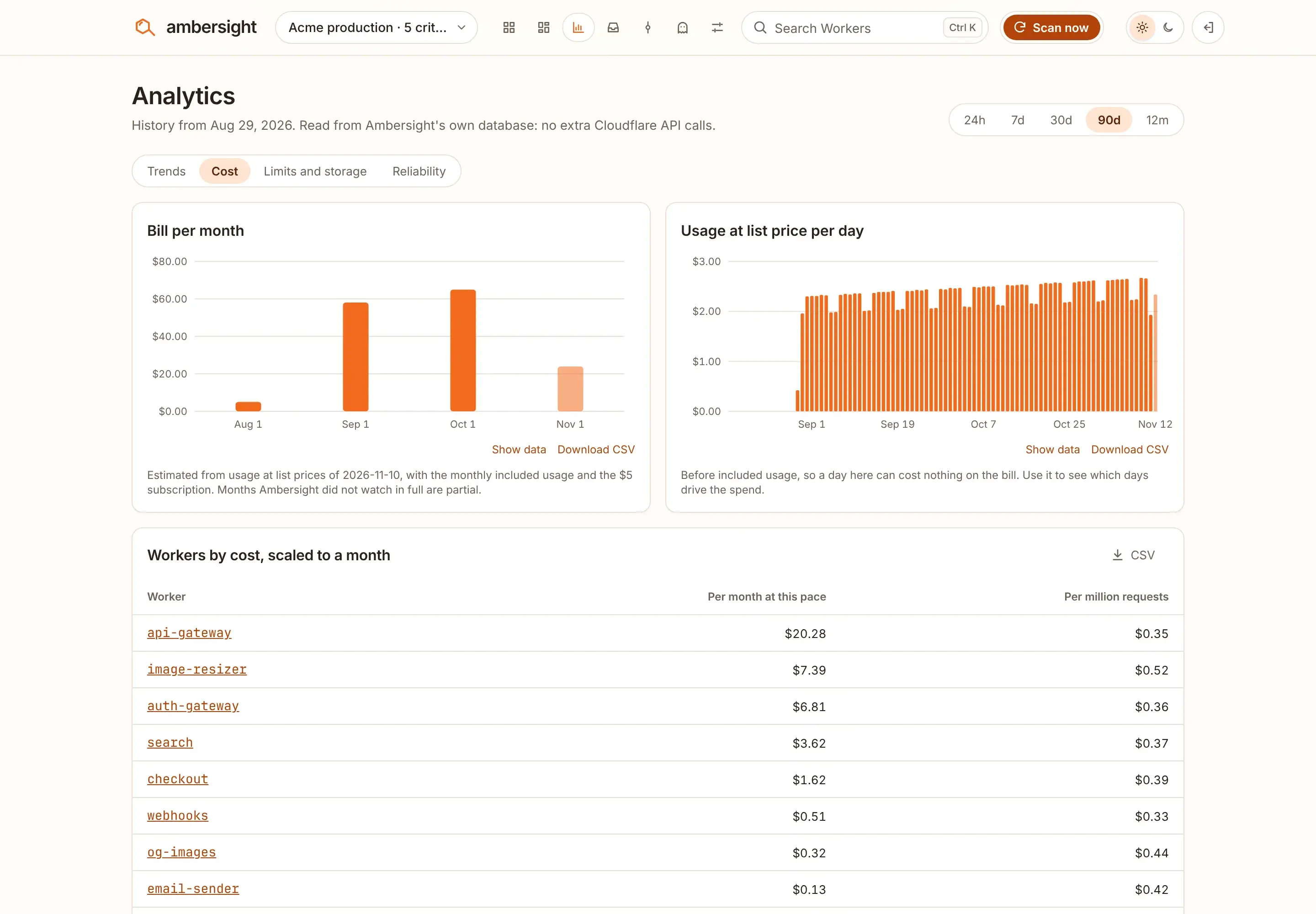
Each runaway finding carries the cost in dollars. The Cost page shows the estimated bill so far this month, the month-end forecast and the costliest Workers. The estimate uses list prices and is updated within the hour. Your Cloudflare invoice stays the final record.
OverviewDemo fleet
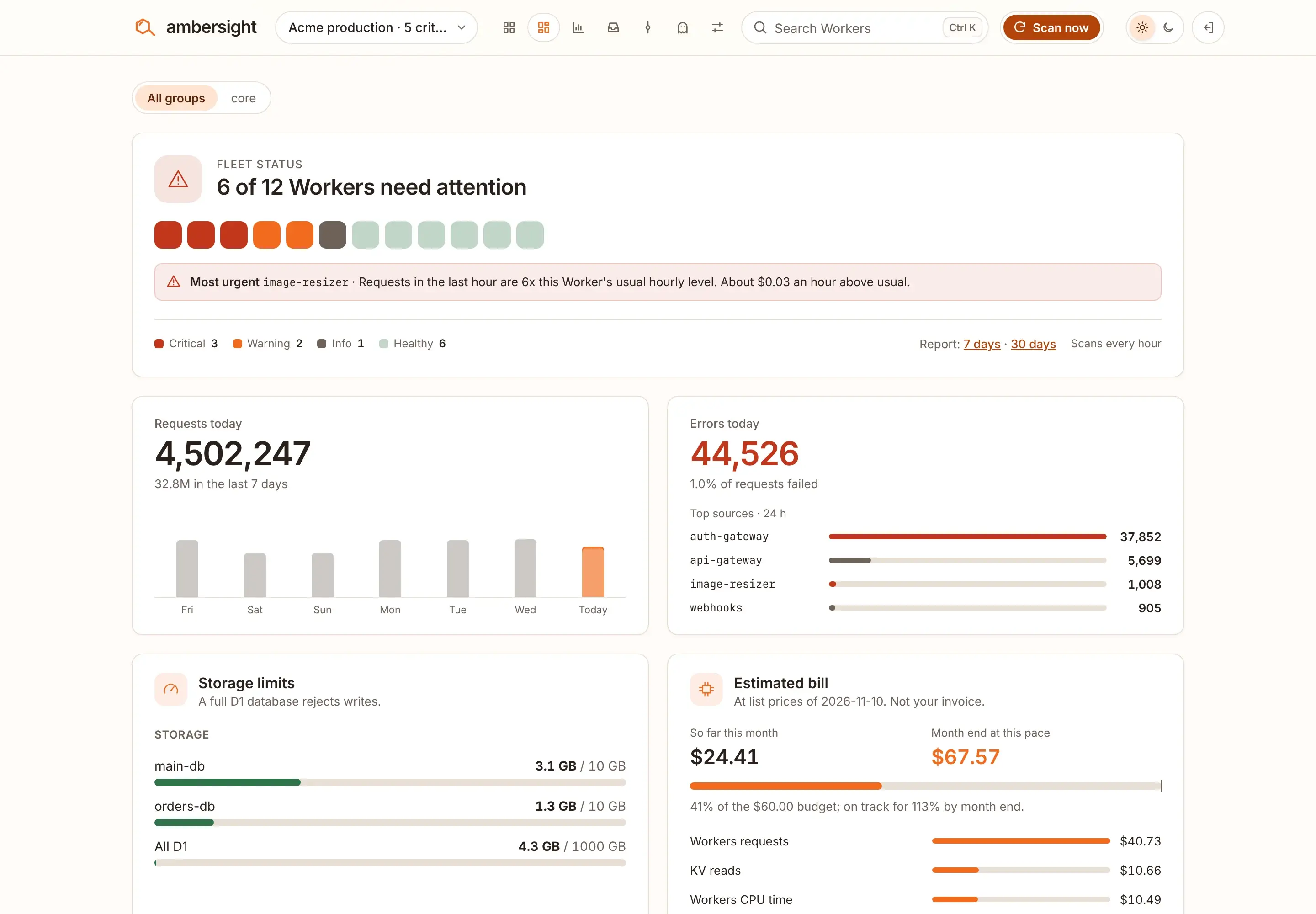
image-resizer at 6x its usual hour, and the estimated bill sits beside the monthly budget.CostDemo fleet
Sources
Every Cloudflare limit, price and error code on this page comes from Cloudflare's documentation, read on . Cloudflare changes these pages. When a number here and Cloudflare's page disagree, Cloudflare's page is right.
| Cloudflare page | Used for | Page updated |
|---|---|---|
| Workers: Spending limits | What the Workers spending limit covers, what stops, error 1103, timing | |
| Billing: Spending limits and alerts | Workers and Durable Objects limits, email alerts at 80% and 100%, reset at the billing period | |
| Durable Objects: Spending limits | The separate Durable Objects limit and what it does not stop | |
| Billing: Budget alerts | Account-wide budget alerts by email, which never pause usage | |
| Workers: Errors and exceptions | The meaning of error 1103 | |
| Workers: Pricing | The $5 minimum, requests and CPU time; subrequests and static assets are not billed | |
| Durable Objects: Pricing | Requests (alarms included) and duration, and the $419.30 example | |
| D1: Pricing | Rows read and written on Paid; monthly allowances reset on the renewal date | |
| Workers KV: Pricing | Reads and writes on Paid | |
| Queues: Pricing | Operations on Paid; each retry is a read operation | |
| Observability: Pricing | Logs billed per GB from 1 December 2026 |