Daily limits
Each daily limit is counted for the whole account. Spreading the work over several Workers does not help. Past a limit, calls of that kind fail until the count resets. Requests past the first limit return error 1027, explained on the error 1027 page. The others fail inside your code.
| Limit | Workers Free allows | Past the limit | Ambersight check |
|---|---|---|---|
| Worker requests | 100,000 a day, all Workers, Pages Functions and Workflow executions together | Error 1027 on fail-closed routes; fail-open routes skip the Worker | budget:free-daily-requestsWarning at 70%critical at 90% |
| D1 rows read | 5 million a day | Queries fail with an error | budget:free-daily-d1-rows-readWarning at 70%critical at 90% |
| D1 rows written | 100,000 a day | Queries fail with an error | budget:free-daily-d1-rows-writtenWarning at 70%critical at 90% |
| KV reads | 100,000 a day | Further reads fail with an error | budget:free-daily-kv-readsWarning at 70%critical at 90% |
| KV writes | 1,000 a day (to different keys) | Further writes fail with an error | budget:free-daily-kv-writesWarning at 70%critical at 90% |
| KV deletes | 1,000 a day | Further deletes fail with an error | budget:free-daily-kv-deletesWarning at 70%critical at 90% |
| KV list requests | 1,000 a day | Further lists fail with an error | budget:free-daily-kv-listsWarning at 70%critical at 90% |
| Durable Object requests | 100,000 a day | Further requests fail with an error | budget:free-daily-do-requestsWarning at 70%critical at 90% |
| Queue operations | 10,000 a day | Not stated in Cloudflare's docs | budget:free-daily-queue-opsWarning at 70%critical at 90% |
| Workflow steps | 3,000 a day | Not stated in Cloudflare's docs | budget:free-daily-workflow-stepsWarning at 70%critical at 90% |
| Workers AI | 10,000 Neurons a day | Further operations fail with an error | budget:free-daily-ai-neuronsWarning at 70%critical at 90% |
| Logs ingested (from 1 December 2026) | 0.5 GB a day | New logs are not stored until 00:00 UTC | usage:logs-free-allowanceInfo at 70%warning above the allowance |
The Workers AI check runs on Workers Paid too, as info once the free 10,000 Neurons are used, because the rest is billed. The others are hidden on Workers Paid, where these products bill past their monthly allowance instead of stopping.
Limits and storageDemo fleet
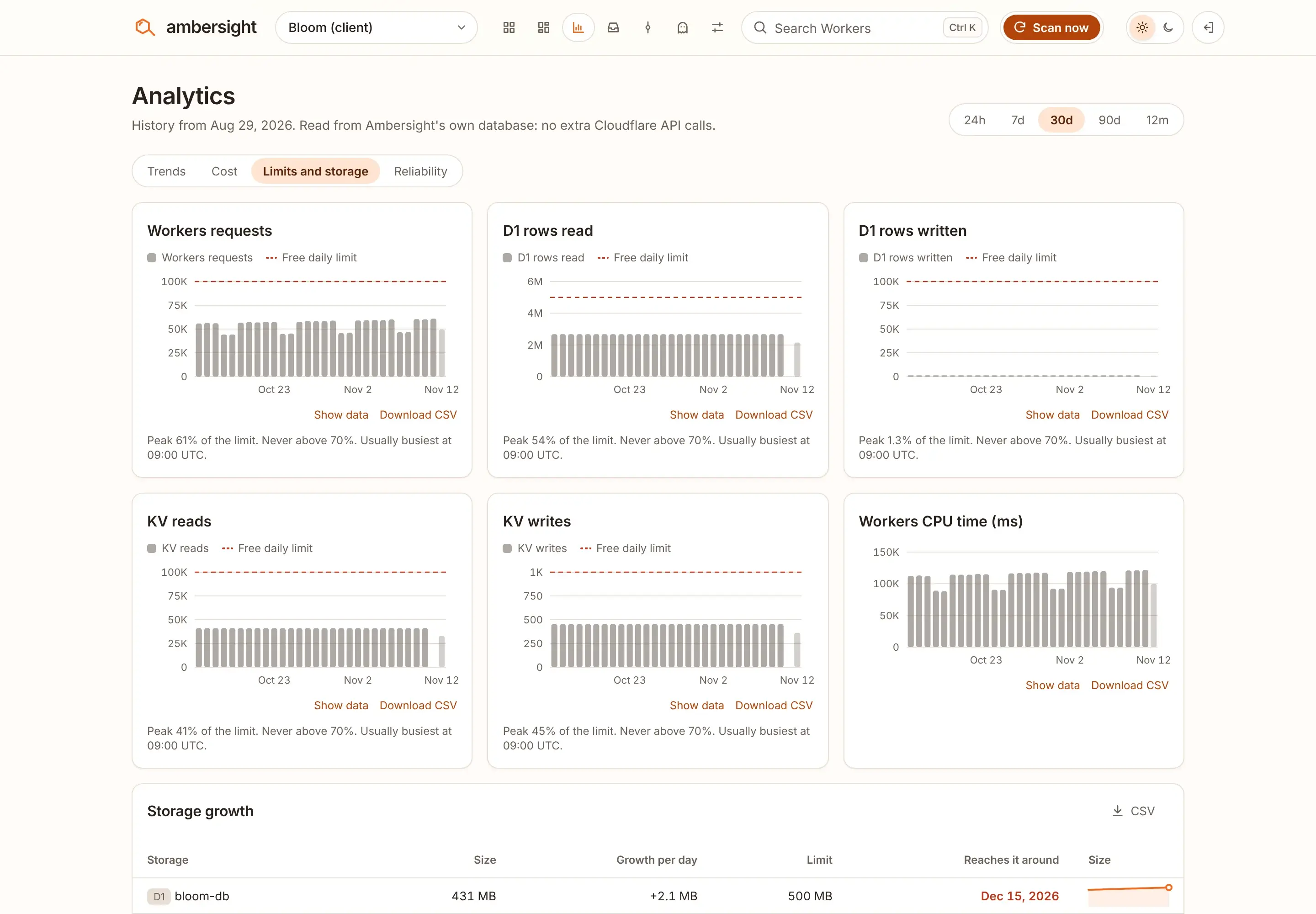
Per-request limits
These apply to every single invocation, not to the day. A Worker can be well inside its daily requests and still fail on CPU time. Time spent waiting on fetch(), KV or a database does not count as CPU time.
| Limit | Workers Free allows | Past the limit | Ambersight check |
|---|---|---|---|
| CPU time | 10 ms per request | Error 1102, Worker exceeded resource limits | errors:cpu-near-limitInfo when p99 CPU reaches 80% of 10 ms |
| CPU or memory limit hit | 10 ms CPU, 128 MB memory per isolate | Error 1102 | errors:resource-limitWarning on any invocation over a limit in 24 hours |
| Subrequests | 50 per request, 1,000 to Cloudflare services | Further subrequests fail | errors:subrequests-near-limitWarning at 40 or more on average over 24 hours |
| CPU time of a Cron Trigger | 10 ms per run | Execution is terminated | cron:cron-cpu-near-limitWarning at 80% of the limit |
Ambersight sees only the average number of subrequests per invocation. When the average is 40, some invocations are probably over 50 already.
Storage and account limits
Ambersight reads storage sizes once a day with its inventory. A full D1 database rejects writes. Past 10 GB, R2 is billed rather than blocked.
| Limit | Workers Free allows | Past the limit | Ambersight check |
|---|---|---|---|
| Cron Triggers | 5 per account | No more can be added | cron:cron-countInfo at 4warning at 5 |
| D1 database size | 500 MB per database | Writes are rejected until data is deleted | budget:storage-d1-dbWarning at 80%critical at 95% |
| D1 storage | 5 GB per account | Writes are rejected until data is deleted | budget:storage-d1-accountWarning at 80%critical at 95% |
| KV storage | 1 GB per account | Not stated in Cloudflare's docs | budget:storage-kv-accountWarning at 80%critical at 95% |
| Durable Object storage | 5 GB per account | Not stated for the account total | budget:storage-do-accountWarning at 80%critical at 95% |
| R2 storage | 10 GB-month free each month | Billed, not blocked | budget:storage-r2-accountWarning at 80% |
| Environment variables and secrets | 64 per Worker | No more can be added | drift:vars-near-limitInfo at 58warning at 64 |
Limits Ambersight does not watch
A few Workers Free limits have no check. Keep an eye on them yourself:
- Durable Object duration: 13,000 GB-s a day.
- Workers per account: 100.
- D1 databases per account: 10.
- Worker size: 64 MiB uncompressed, and 1 second of startup time.
- Static asset files: 20,000 per Worker version, 25 MiB each.
How the warnings work
After each scan, every daily check compares the account's usage so far today with its limit. At 70% it raises a warning and projects the time you will run out at today's pace, or says you should stay under it. At 90% the finding turns critical, and by default critical findings are e-mailed right away. Both lines are settings: budgetWarn (0.7) and budgetCritical (0.9).
The numbers come from the GraphQL queries Ambersight already makes, so most of these checks cost no extra API calls. Scans run every hour by default. With 30 Workers, Ambersight uses well under 1% of the daily requests and 1 of the 5 Cron Triggers, so it does not become the limit it warns about.
The full list, with every threshold and fix, is on the checks page.
Sources
Every Cloudflare limit, price and error code on this page comes from Cloudflare's documentation, read on . Cloudflare changes these pages. When a number here and Cloudflare's page disagree, Cloudflare's page is right.
| Cloudflare page | Used for | Page updated |
|---|---|---|
| Workers: Limits | Requests, CPU time, memory, subrequests, Cron Triggers, environment variables, error 1027 and 1102 | |
| Workers: Pricing | Free plan requests and CPU time; static assets are free | |
| Pages Functions: Pricing | Pages Functions share the 100,000 daily requests | |
| D1: Pricing | Rows read and written per day, 5 GB storage, what happens past a limit | |
| D1: Limits | 500 MB per database, 10 databases | |
| Workers KV: Pricing | Reads, writes, deletes and lists per day, 1 GB storage | |
| Durable Objects: Pricing | Requests and duration per day, rows read and written | |
| Durable Objects: Limits | 5 GB storage per account; writes fail at the storage limit | |
| Queues: Pricing | 10,000 operations a day | |
| Workflows: Pricing | 3,000 steps a day; executions share the Workers requests | |
| Workers AI: Pricing | 10,000 Neurons a day | |
| R2: Pricing | 10 GB-month of storage free each month | |
| Observability: Pricing | 0.5 GB of logs a day on Free from 1 December 2026 |